Your Wedding Mood Board Belongs Next to Your Guest List
Boards on Brunchie put your inspiration right next to the RSVPs, budget, and seating — private to you and your planner, or open to guests when you're ready.
The inspiration for your wedding is probably scattered across three places right now. A Pinterest board you've been pinning to for eight months. A phone camera roll full of screenshots from Instagram. A shared notes thread with your partner where you dropped that one image of the exact shade of terracotta you want for the napkins. None of it is where you actually plan — the guest list, the RSVPs, the "did we pay the florist deposit?" question.
Boards on Brunchie fix that.
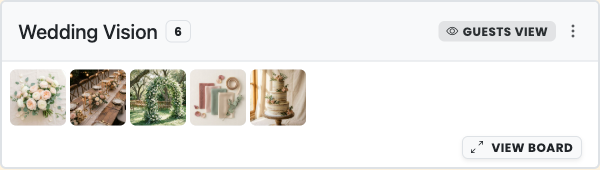
What a board actually is
A board is a grid of image tiles that lives right on your hangout, on the Planning tab — alongside your guest list, RSVPs, and budget. You can have as many boards as you like, each with its own name and its own privacy setting.
Add tiles by uploading photos from your device (you can drop multiple files at once), or paste a Pinterest pin link and Brunchie pulls in the pin's image plus a link back to the original. Drag tiles to reorder until the board reads exactly the way you want.
Each board also shows up as a card in your hangout's posts feed, so the whole picture of your event — not just the logistics — is in one place. And if you want to ask Benny about it, you can — just ask "what's on the mood board?" right in the chat.
Full Pinterest board import (connect your Pinterest account and bring in a whole board at once) is coming soon, rolling out as Pinterest approves. Uploading and pasting individual pin links work everywhere right now.
The Brunchie team built boards because we kept hearing the same thing from couples: "all our inspiration is somewhere else." It shouldn't be.
Why your vision board being somewhere else is actually a problem
Here's the thing about keeping your wedding inspiration in a separate Pinterest board or a shared notes app: it creates a gap between how you're imagining your wedding and how you're planning it.
You're deep in the guest list, trying to decide whether Table 4 is the right spot for your college friends who've never met your work colleagues, and you vaguely remember there's a photo of a round table arrangement you loved — but it's in the camera roll, somewhere around last November. The vision and the logistics never talk to each other.
And sharing it with your planner? That's usually a separate login, a shared link that gets stale, or a "here's the board, let me know what you think" email that starts its own thread. Your planner ends up working from a snapshot of your vision, not the live version.
Every tool wants to be the one place you plan your wedding. Most fail because they treat inspiration as an add-on. Boards started from the opposite direction: start with the vision, then attach the logistics to it.
What changes for you
Your vision is private until you decide it isn't. Boards default to hosts-only — so you can curate the mood of your wedding at your own pace before you let anyone see it. When you're ready, you flip a setting and guests can view. Or you go further and open it to guests-can-edit, so your wedding party can add their own inspiration to the mix.
Your planner gets access without getting your account. Add your planner as a co-host, and they can see and contribute to every board you've marked hosts-only. They work from the same living board you're working from — not a screenshot you sent in January.
A single privacy setting per board means you can have both. A private vision board for the couple and the planner, and a separate open-to-guests board where people can see the vibe before the day. Same hangout, two different audiences.
Boards aren't just for weddings. The same mechanic works for a potluck — open a guests-can-edit board so people add a photo of what they're bringing, and everyone can see whether the dessert slots are covered. Or a costume party, where guests post their inspiration before the night. Or a group trip, where you drop hotel and itinerary images so everyone knows the vibe before they book flights.
The guests-can-edit setting is one of those features that sounds niche until you've needed it exactly once. Suddenly a potluck board is the most useful thing you've added to a hangout.
The Pinterest question
Yes, you can paste a Pinterest pin link directly into a board and Brunchie brings in the image. It links back to the original pin automatically, so you never lose the source.
What doesn't work yet — and this is real, not a "coming soon" that means never — is importing a whole Pinterest board at once. That requires connecting your Pinterest account, and it's rolling out gradually as Pinterest works through their app-approval process. Until it's available to you, uploading images and pasting individual pin links gets you there. Most people find pasting pins faster than they expected.
How to get started
Open any hangout, tap +, go to Docs, and choose Board. Name it, pick who can see it, and you're on the board and ready to add images. That's it.
If you don't have a wedding hangout yet, you can start one at brunchie.app — your guest list, RSVPs, budget, seating, and boards are all there, all free, all in one place.
The whole thing takes about two minutes to set up. The eight months of Pinterest screenshots you paste in after that — that part takes a little longer.
Try Brunchie free
Brunchie replaces the spreadsheet, the group chat, and the half-finished invite list. Free forever for the people we built it for.
Get started