Ask Benny Guide
Ask Benny anything about your hangout — when, where, what to wear, what you owe — and get an answer in seconds without texting the host
Feature overview
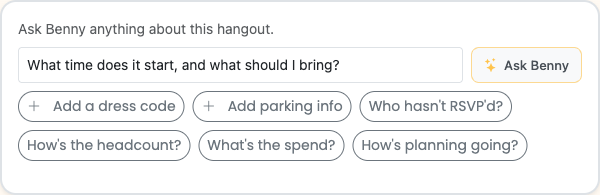
Every hangout has an Ask Benny card — a plain-language Q&A box right on the page. Type a question about that event in whatever words come to mind, and Benny answers in a sentence or two from the event's real data. No texting the host, no hunting through the group chat, no waiting on a reply.
Benny only knows about the hangout you're on. It can't change anything, can't look at other events, and it won't make things up. If the host hasn't set something, Benny says so — and points you to the person who can.
Personal note — the Brunchie team built Benny because the same five questions show up on basically every hangout. What's the address? What do I wear? Can I bring a plus-one? What do I owe? Every one of those should take two seconds, not a reply chain.
How it works
- Open a hangout. The Ask Benny card is right there on the page — you don't have to find it.
- Tap a chip or type your own question. Suggested chips are tailored to that event and only show questions Benny can actually answer right now. Or just type in plain language — "can I bring a dog?", "what's the parking situation?", "who do I play in the first round?"
- Benny answers in a sentence or two, with a source link you can tap to see where the answer came from. Jump straight to the guest list, the seating chart, the expenses tab, or wherever the real data lives.
- If the answer isn't there yet, Benny tells you the host hasn't set it and shows you an Ask the host button. One tap drops the question into the hangout feed with the host already tagged — you just type and send.
Personal note — the chip suggestions are the part that surprises people. Benny only shows you chips for things it can actually answer on this specific event. So if there's no seating chart, "where am I sitting?" doesn't show up. No tease, no dead ends.
What you can ask
For guests
These are the questions you'd normally text the host. Now you can skip that step:
- When and where — start time, address, what to look for when you arrive
- RSVP deadline — "when do I need to reply by?"
- Dress code and what to bring — "is it black tie?", "is it BYOB?", "should I bring anything?"
- Getting there — "where do I park?", "how do I get in?"
- Plus-ones and kids — "can I bring a guest?", "are kids welcome?"
- Your seat — "where am I sitting?" (when a seating chart is shared)
- Weather — "what's the weather going to be?" — Benny reads the forecast already stored on the hangout. Ask within about a week of the event; earlier than that and the forecast isn't in yet (Benny says so rather than guessing).
- What you owe — "am I settled up?", "what do I still owe?" — and ask in any currency: "what do I owe in USD?", "what do I owe in euros?". Benny converts at today's rate and labels the answer approximate.
- Who's coming — headcount (Benny respects the host's guest-list privacy setting, so you may see a number rather than names).
- Polls and shared links — open polls, answered polls, links the host pinned for the group.
- Documents, even if you don't know the exact name. Ask for "the contract" and Benny finds the file named "agreement." Ask for "the waiver" and it finds the "release form." Common synonyms all work.
- What's on the mood board — "what's on the inspiration board?" — Benny tells you the board name and how many ideas are pinned (you'll only see boards the host has shared with guests).
- What's been posted lately — "any updates?", "what have I missed?" — Benny gives you the recent feed posts and a peek at their comments. Host-only posts stay hidden.
- Spreadsheets and itineraries — what's on the shared itinerary, what's in the seating chart, what phase of the trip are we in.
- The bracket — "who do I play next?", "who's in the final?", "who won the tournament?" — Benny reads the whole playoff structure and tells you where things stand.
- Catch me up — ask "summary of everything," "tl;dr," or "catch me up" and Benny gives a quick rundown of the whole hangout: when and where, who's coming, open polls, what's been posted, what you owe, shared links and docs. Everything scoped to what you can already see.
For hosts
Hosts and co-hosts get all the guest answers above, plus a planner view:
- Who hasn't RSVP'd yet — "who hasn't replied?", "who's still pending?"
- Headcount and spend — "how many people are coming?", "what's the total spend so far?"
- Planning gaps — "how's planning going?", "what are guests going to ask that I haven't answered?" — Benny gives you a quick read on what's still missing before you send invites, so you can fill those fields in proactively instead of fielding the same DMs later.
Personal note — the planning-gaps prompt is the host feature that sticks. Ask it before you share the link and you'll get a short list of things like "no parking instructions set" or "RSVP deadline isn't filled in." Fix those and the repeat texts almost stop.
Use cases
A wedding with a vision board and seating chart. Guests can ask "what's on the mood board?" to see the aesthetic (if the couple shared it), "where am I sitting?" to find their table before the night starts, and "what do I owe?" to settle up the group accommodation without texting anyone. The couple can ask "who hasn't RSVP'd?" and "how's planning going?" to stay on top of the guest list without building a separate tracker.
A game-night or rec-league tournament. Players can ask "who do I play next?", "what's the bracket looking like?", and "who won?" and get a real answer from the bracket — not a screenshot from two rounds ago. Ask "what do I owe for the entry fee?" and Benny handles any currency conversion if your crew is spread across different countries.
A group trip with expenses and a shared itinerary. Every traveler can ask "what do I owe in USD?" (or CAD, euros, whatever fits) without needing to hunt the expenses tab. Ask "what's the itinerary for day two?" and Benny reads the shared itinerary back. Ask "what's the weather?" a week out and get the forecast without leaving the hangout.
What Benny won't do
These aren't things Benny can't figure out yet — they're intentional limits, and knowing them upfront saves a frustrating ask.
- No contact info. Ask for anyone's email or phone number — even as the host asking about your own guest list — and Benny declines. It'll tell you who's coming and who hasn't replied, but contact details stay private.
- No changes. Benny can't RSVP you, pay an expense, send an invite, post to the feed, or edit any part of the event. It's purely read-only.
- Only this hangout. Questions about other events, general knowledge, or anything outside this specific hangout don't get an answer. Benny knows this event; that's it.
- No guessing. If the host hasn't set a dress code, Benny doesn't invent one. If the forecast isn't available yet, Benny doesn't invent a temperature. You get "I don't have that yet" and a path to find out.
Tips
- Tap the source link. Every answer includes a link to where the answer came from — the guest list, the expenses tab, a document, the seating chart. Tap it to verify and see the full context.
- Use natural language. You don't need to phrase it as a command. "Is it okay if I bring my dog?" works just as well as "pet policy?"
- Ask for documents by any name. "Contract," "agreement," "waiver," "release form," "schedule," "itinerary" — Benny matches synonyms, so you don't have to know what the host named the file.
- Ask close to the event for weather. Forecasts land roughly a week out. Outside that window, Benny will tell you it doesn't have one yet.
- Currency conversions are approximate. Benny labels any converted amount as approximate and shows the original amount alongside it. For settlement purposes, the original figure in the event's currency is what matters.
- Hosts: run "how's planning going?" before you share the link. It's the fastest way to find out what guests are going to ask and fill those gaps before the repeat texts start.
- The fuller the event, the better Benny answers. Dress code, parking notes, what to bring, a clear RSVP deadline — every field the host fills in is a question guests don't have to ask.
Related guides
- Expense Splitting — tracking who paid what and settling up
- Polls — collecting answers from the group on dates, food, options
- Group Trip Planning — full trip workflow with expenses, itinerary, and more
- Wedding Planning — the full wedding planning flow, including host-private budgets and seating
Common questions
Does Ask Benny work for guests or just hosts?
Can Benny tell me everyone's email addresses or phone numbers?
What if the host hasn't filled something in?
Can Benny RSVP for me or pay an expense?
Can Benny answer questions about other events or general trivia?
Can Benny convert what I owe to a different currency?
What if the event is months away and I ask about the weather?
Try Brunchie free
Brunchie replaces the spreadsheet, the group chat, and the half-finished invite list. Free forever for the people we built it for.
Get started