Birthday Party Setup Guide
Plan a birthday party—polls for date and venue, expense splitting, and a simple timeline
Birthday Party Setup with Brunchie
Coordinate the surprise, split the cake cost, and keep everyone on the same page—without group chat chaos.

What you get
Run a quick poll and lock it in.
Track who owes what and move on.
Share a plan that is easy to follow.
What the template includes
The Birthday Party template gives you a ready-made hangout with everything pre-configured:
- A date poll so guests can vote on the best day
- A venue poll to narrow down location options (house party, restaurant, park, etc.)
- An expense tracker pre-loaded with common birthday categories: cake, decorations, venue deposit, and gifts
- A timeline template with slots for arrival, food, cake and candles, gifts, and cleanup
- A guest list to track RSVPs, dietary restrictions, and plus-ones
You can customize every piece after creating the hangout. Remove what you don't need or add extra polls as the party grows in scope.
Step 1: Create a hangout
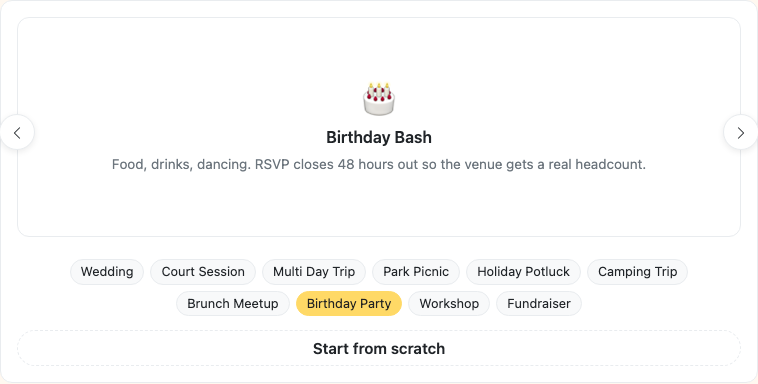
Tap + and pick Birthday Party from the template carousel in Step 0 of the wizard. The card shows chips — Itinerary · RSVP survey · Seating chart · Notes — indicating what it seeds for you. The template pre-fills the title, description, and a date poll so you can get straight to inviting people.
For larger parties (20+ guests), consider breaking the planning into phases. Start with the inner circle to lock down the date and venue, then open the hangout link to the wider guest list once the basics are set.
Have guests without email? Use the "Add by name" tab when inviting to add anyone by just their first and last name. No email or account needed — they'll be on your guest list for headcount and seating.
Step 2: Lock the details
Once the poll closes, you have date and venue. Share the link—guests see time, place, and who's coming.
Step 3: Split costs
Cake, decorations, venue—add expenses as you go. Brunchie tracks who paid and who owes.
For group gifts, one person can front the cost and add it as an expense. Brunchie calculates each person's share automatically, so the birthday person never sees the split. Check out our expense splitting guide for more on managing group costs.
Step 4: Share the timeline
Arrival, cake, gifts, cleanup—a simple itinerary so the party runs smoothly.
Use cases
- Surprise parties: Share the hangout with everyone except the birthday person. Coordinate arrival times, parking, and the "surprise" moment using the itinerary.
- Kids' birthday parties: Use the guest list to track RSVPs and allergies. The timeline helps volunteers know when to set up bounce houses, start games, or bring out the cake.
- Milestone birthdays (30th, 50th, etc.): Larger groups benefit from polls to choose a venue that fits the budget and headcount. Split a venue deposit across the group with expense tracking.
- Dinner party birthdays: Keep it simple with a date poll and a bill split at the end of the night.
Tips
- For parties with 10+ people, close polls after 48 hours. Waiting too long for stragglers delays everything.
- Add a "What to bring" poll if guests want to contribute food, drinks, or decorations.
- Use the itinerary to set a clear end time. It helps guests plan their evening and keeps the party from trailing off.
- If you are splitting the cost of a group gift, add it as a single expense and exclude the birthday person from the split.
- If your venue has a headcount limit, set an attendee limit so RSVPs are first come first served — no awkward "sorry, we're full" messages.
- Got a TV at the venue? Run the photo slideshow or the event info countdown on it — both modes work for any party, not just weddings. See the Presenter Mode guide.
- Planning a holiday or seasonal birthday? Our holiday party planning blog post has ideas for themed celebrations.
Try Brunchie free
Brunchie replaces the spreadsheet, the group chat, and the half-finished invite list. Free forever for the people we built it for.
Get started