Calendar Sync Guide
Subscribe your calendar to a hangout—the event, and every update to it, lands in Google, Apple, or Outlook automatically
Feature overview
Keep everyone synced
Plans change, nobody is lost
Auto-updates so no one misses a change.

How it works
Calendar sync puts a Brunchie hangout into the calendar you already live in—Google, Apple, or Outlook—and keeps it current. It's a live subscription, not a one-time copy:
- Tap Sync Calendar on the hangout and pick your provider.
- The hangout appears in your calendar—date, time, and location, with a link back to the hangout page.
- When the host changes something—pushes dinner an hour, moves the venue, updates the itinerary—the change flows through to your calendar on its own. You don't re-add anything.
Brunchie only ever writes the hangout to your calendar. It never reads what's already in there.
Sync a hangout to your calendar
You do this from the hangout itself—there's no account-level setup and no provider login to authorize:
- Open the hangout (or, if you just RSVP'd, use the prompt on the confirmation screen).
- Tap Sync Calendar and choose Google, Apple, or Outlook.
- Confirm the subscription in your calendar app. From then on it stays in sync.
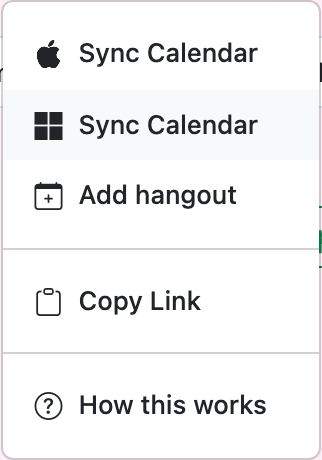
The same dropdown offers two more options:
- Add hangout — a one-time, static copy (the event lands once and won't update). Use this if you only want the date on the calendar and don't care about later changes.
- Copy Link — grabs the subscription URL so you can paste it into a calendar app that isn't in the list.
Your personal Brunchie feed
Beyond a single hangout, Brunchie publishes a personal feed of all the hangouts you're part of as one .ics subscription. Subscribe to it once and every hangout you join—now and later—shows up in your calendar automatically, no per-event tapping. It's the "set it and forget it" option for people who plan a lot.
What syncs—and what Brunchie can see
This is a publish-out feed, which makes the privacy story simple:
- Brunchie writes to your calendar; it does not read it. There's no "connect and authorize" step that hands over your calendar contents, because no such handover happens.
- What lands in your calendar: the hangout's title, date/time, location, and a link back to the page. Itinerary updates ride along on the live subscription.
- What Brunchie never sees: your other events, your free/busy, anything else on your calendar.
- Unsubscribe anytime from your calendar app—the hangout simply stops updating. Nothing else changes.
Use cases
- Weddings — guests subscribe once; when the rehearsal time or shuttle pickup shifts, their calendars update without a single "heads up, the time changed" text. See the wedding planning guide.
- Group trips — the whole crew subscribes to the trip hangout; itinerary edits flow to everyone's phone.
- Recurring hangouts — a standing game night or pickup session lands on every player's calendar and stays put.
FAQ
Does this read my calendar or see when I'm free? No. Calendar sync only publishes the hangout to your calendar. Brunchie can't see your other events, and there's no free/busy or availability scanning—use a poll when you need to find a time that works for the group.
Which calendars are supported?
Google Calendar, Apple Calendar (via iCloud), and Microsoft Outlook (including Outlook 365 and Outlook.com). Any app that accepts an iCal/webcal:// subscription works too—use Copy Link to grab the URL.
What's the difference between "Sync Calendar" and "Add hangout"? Sync Calendar subscribes you—future changes to the hangout flow through. Add hangout drops a one-time static copy that won't update.
Will the event update if the host changes the time or place? Yes, if you used Sync Calendar (the live subscription). A one-time Add hangout copy won't.
Do I need a Brunchie account to subscribe? You can subscribe to a single hangout straight from the RSVP confirmation. The personal "all my hangouts" feed is tied to your account.
Tips
- Use Sync Calendar (not Add hangout) for any plan that might move—weddings and trips almost always do.
- Subscribe your guests early: the whole point is that later changes reach them automatically, so the earlier they're on the feed, the more it pays off.
- Calendar sync is one-way and optional—it's about visibility, not scheduling. To pick a date in the first place, run a poll.
{{demo_preview:calendar}}
Try Brunchie free
Brunchie replaces the spreadsheet, the group chat, and the half-finished invite list. Free forever for the people we built it for.
Get started